
Setup
Set up p³ bot on your phone or PC, with us on the call.
p³ bot setup on a call, about 15 minutes: Android 11+ phone or emulator, or Windows 10/11, your club account, a profile for your game, first session with us.
You pay through Telegram, then we jump on a call. Around 15 minutes later, the bot is at your club table. Your device, PPPoker account, and money stay with you; we do not access any of them. Here is the call process so you are not spending the first ten minutes looking for a charger or club password.
Before the call
Step 1. Pick the device
You can run p³ bot on Windows 10 or 11, or on Android 11 and up using a real phone or an emulator. An iOS build does not exist.
The bot runs on your device, next to the PPPoker app, and our AI makes the decisions; the actions land on the table the way yours would. That makes the device more important than it is with an advice tool, since the game runs there and the bot needs to run on that device too.
On their end, PPPoker monitors GPS data, network IPs, device signatures, and reports submitted by club members. Every check they run simply sees the actual machine hosting your session.
Phones: Android 11 or newer. Emulator or PC: an Android emulator for Windows, or the native Windows 10/11 build, on a machine with 16 GB of RAM.
Step 2. Have your own club account ready
Your balance, club access, agent contact, and PPPoker profile remain entirely under your control. We stay out of your cashier, never message agents, and do not register player accounts. Anyone vending software who demands your agent info is running an operation completely unlike ours.
Before the call begins, log into PPPoker on the device from Step 1 and make sure there is a seat you are permitted to take. If your agent restricts the tables you can enter, the bot stays within those restrictions and only takes seats available to you.
On the call
Step 3. Install and pick a profile
Installation is included in the one-time price (from $700). We handle it with you during the call, directly on your device. The bot is installed on the same phone, emulator or PC you plan to play from. We do not run anything on our end.
Next is your profile. You start from a preset that fits the game you will grind first; another club can be configured later.
After choosing the preset, we tune it for each club. This part takes up most of the call. For every club, we set three things:
- Session length: how long the bot stays at the table before it leaves.
- Number of tables: how many it sits at in that club at once. This is also one of the two things that set your price, so it is fixed at purchase. The limits you play are the other half, which is why the limits you name in Telegram before buying should be the limits the profile gets tuned for on the call.
- Style: how loose or tight the profile plays. The activity 100% on the screen at the proof section on the home page is a style setting that partner chose, not the preset.
Decision timing is not a knob you touch. It varies by spot on its own, and taps land the way a finger lands rather than on the same pixel every time. You will see this in the first session and it will look slower than you expect on some streets. That is by design.
Step 4. Play the first session together
Your first session is run while we stay on the call, using your account, your balance, and the table you chose; we are on the line, not playing your seat. You can watch it join, take a spot, and act. If something needs adjusting for that club, such as a session running too long or a style that does not fit the limits, we fix it there instead of waiting a week to discuss it by text.
Once your session wraps, the session log lands with it. Go through it. That is the quickest read on how the profile you chose behaves at your tables, and it is the thing you pass our way if something seems wrong down the line. One round in a screenshot barely helps us; the full session log points to the setting that needs a tweak.
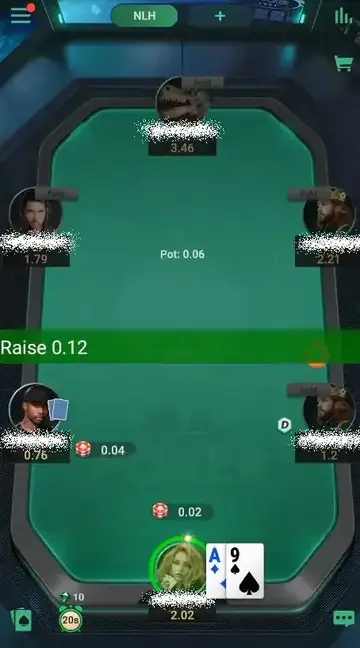
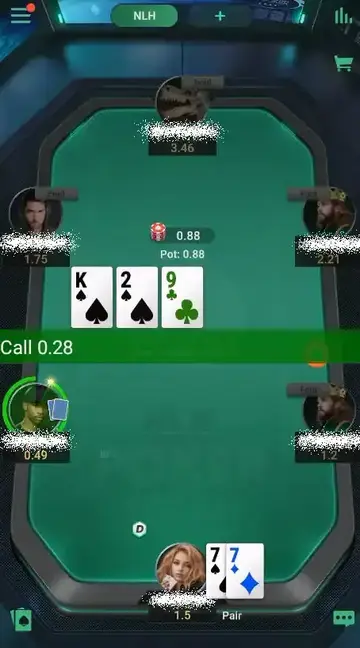
Those two screens up there show what you will see once it runs. A regular PPPoker table, the bot in its seat, its turn to act. No overlay, no second window with arrows. If you figured it would look like a cockpit, it does not.
After the call
What you can run once it is installed
Every game type your club runs, at any table size. The license covers all of it; you do not pay extra per game type.
When PPPoker updates the client
p³ bot updates arrive whenever PPPoker updates its client, and the one-time license covers them. No update fee, no yearly renewal. The bot's interface shows that a new version is out; tap Update, it downloads and restarts, done. Until then, do not start the bot on a client version it has not been built for. Updates follow the client rather than a calendar, so some months bring several and some bring none.
Mistakes we see on install calls
Picking up a device before you read the requirements. Android 11 or newer for phones; for an emulator or the Windows build, a machine with 16 GB of RAM.
Running this on an iPhone. No iOS build exists, so the call is over before it begins.
You own your account from day one, and we keep out of both.
Do not grind right after PPPoker updates their client while our patch is pending. Wait until our release drops.
Free trial
New clients get one day of free use before paying for a license. Ask in Telegram and it is switched on the same day.
Start
We cover all of this in a single call. Message the Telegram bot with your device setup and the club game you plan to run first, and we will book your installation.